Mooer GE150 – Field Report
A melodious multi-effects unit at an affordable price!
The GE150 from the Chinese manufacturer Mooer has been on the market for just over a year. Although it is at the upper end of the price range for an entry-level device, it impresses with its high-quality sound, which is usually only found in more expensive devices. In today's review, we'll find out if you have to make any compromises for the low price.
Technical specifications and range of functions
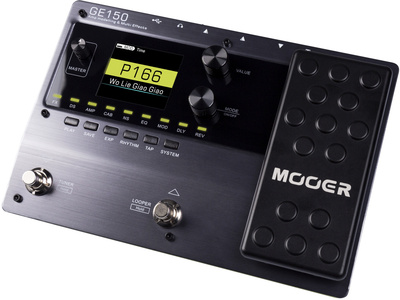
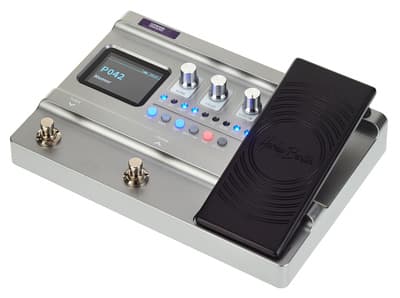
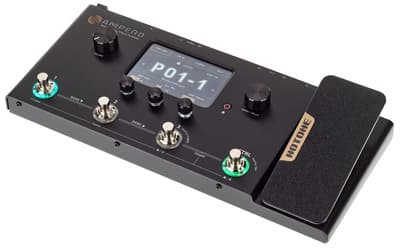
The Mooer GE150 has a green plastic body and a brushed aluminium top. With dimensions of 23 x 16 x 5 cm and a weight of only 690 grams, it is a relatively compact multi-effects unit. While opinions are likely to be divided on the almost toxic green colour of the rest of the housing, we like the design of the top of the GE150.
The device offers a rich selection of 55 amplifier simulations and 26 cabinets. The 151 integrated effects are divided into nine effect blocks, represented by LEDs that light up green when active. There are 200 memory slots available for storing presets. With 40 drum patterns and 10 different metronome settings, the GE150 also has a lot to offer in terms of rhythm. An integrated looper and tuner complete the package.
In terms of controls, the GE150 features a small master volume control next to the display on the top panel, two larger rotary controls for selecting and adjusting settings, an expression pedal, six small buttons, and two footswitches. It is a shame that the effects chain is only represented by LEDs on this device. Many other multi-effects devices have a dedicated button for each stage of the effects chain that can be used to activate the corresponding effect, and which often allows direct access to the effect settings.
Connections and connectivity
When it comes to connections, the Mooer GE150 is rather minimalist. In addition to the guitar input, an additional audio source can be connected via an aux input at the front of the device. There are two large jacks for left and right, as well as a small jack for connecting headphones.
For recording or firmware updates, the GE150 has both a USB-B port for PC/Mac and a USB micro-B port for connecting to mobile devices, such as smartphones. This is referred to as OTG (On-The-Go). Last but not least, there is, of course, a socket for the included 9 V DC power supply. Along with the power supply, the package includes a matching USB cable for the device (USB B).
In summary, the following connections are available:
One input for a guitar (large jack, mono)
1 x aux input (small jack, stereo)
Two outputs (large jacks, L/R mono)
1 x headphone jack (3.5 mm, stereo)
1 x micro USB-B port (OTG)
1 x USB-B port (PC/Mac)
Effects and amplifier simulations
The Mooer GE150 comes with 55 amplifier simulations, 26 cabinet simulations and 151 effects, making it a well-equipped device for beginners. Highlights include:
535 WAH: Dunlop Crybaby (wah)
808: Ibanez Tube Screamer TS808 (overdrive)
BLACKRAT: ProCo Rat (distortion)
GREY FAZE: Dunlop Fuzz Face (distortion)
MTL ZONE: BOSS Metal Zone (distortion)
GOLD CLON: Klon Centaur (overdrive)
65 USTW: Fender 65 Twin Reverb (amplifier)
59 US BASS: Fender 59 Bassman (amplifier)
J800: Marshall JCM800 (amplifier)
E650 CL: Enlg E650 Clean (amplifier)
TRI REC DS: Mesa/Boogie Triple Rectifier Distortion (amplifier)
JAZZ 120: Roland JC-120 (amplifier)
UK 212: Vox AC30 212 (cabinet)
We really like the sound of the Mooer GE150. While you won't get the sound of a professional multi-effects unit, we think the GE150 is right up there in terms of quality for an entry-level product.
Incidentally, a very unusual feature at this price point is support for loading additional impulse responses (IRs). The GE150 has 10 memory slots for cabinet IRs. Support for IRs can greatly improve sound quality. Adding a Celestion IR, for instance, can greatly improve the device's sound.
Looper and rhythm patterns
For practising without bandmates, the Mooer GE150 features an integrated phrase looper and a selection of 40 drum patterns. The looper can record up to 80 seconds of audio and is activated by pressing and holding the right foot switch. In looper mode, pressing and holding the right foot switch starts recording or begins an overdub, while pressing and holding the left foot switch stops playback or overdubbing and deletes the entire loop. Overall, we find the looper a little too simple. While the basic functions are present and 80 seconds of recording time is ample for most applications, unfortunately, we could not find features such as undo/redo.
You can activate the drum machine on the GE150 using the small RHYTHM button below the display. This button will then light up green. Use the rotary controls next to the display to select a rhythm pattern or a metronome. You can also adjust the pattern, BPM and volume of the selected option. Next to the 'RHYTHM' button is a 'TAP' button that allows you to tap in the tempo. With 40 patterns to choose from, the drum machine has something to suit every taste.
Operation
While the sound quality of the GE150 is impressive for a device in its price range, there are a few operational weaknesses. The operating concept is relatively simple. There is an LCD display showing settings that can be changed using the rotary controls next to it. The device's various features can be accessed via the two footswitches and the six small buttons, some of which are equipped with LEDs. The footswitches also function as buttons for selecting a memory location.
As previously mentioned, the device does not have any buttons dedicated to the effects chain; only corresponding LEDs are provided. For a multi-effects device of this size, we find this a little strange, as there would definitely have been enough space for more buttons. While standing, you can only operate the two footswitches and the expression pedal, meaning that you can only select presets and adjust settings assigned to the pedal. The looper is the only other feature that can be operated in this way; for everything else, you have to use your hands to fiddle with the small buttons and rotary controls.
Mooer provides free editor software that allows you to connect the device to a PC or Mac. This allows you to manage presets and IR files, install firmware updates, and record your playing directly.
If you want an overview of all the effects and amps before buying, take a closer look at the manufacturer's online manual. At first glance, the 30-page manual seems comprehensive, but on closer inspection, it becomes apparent that it could have provided much more detail in some areas. For instance, the drum machine — an important feature — is covered in just five sentences and a display screenshot, leaving many questions unanswered.
Overall, we found the operation reasonably intuitive, though somewhat cumbersome in places. Entry-level devices in a similar price range perform significantly better in this regard. The settings options for the effects themselves are also rather limited. Depending on the effect, only three or four options can be adjusted, and the order of the effects cannot be changed.
Conclusion
However, the Mooer GE150 is an excellent-sounding multi-effects device for the price, offering a wide range of effects and amplifiers. We particularly like the support for impulse response files, a feature which is more commonly found in devices intended for advanced users or professionals.
While the device is intuitive enough to use, it could be improved. Furthermore, the individual effects offer hardly any settings, and the order of the effects in the chain cannot be changed. The GE150 is mainly suitable for practising at home, where the integrated looper and numerous rhythm patterns make it great fun. For live performances, however, the controls may present an obstacle, making the GE150 less suitable for this purpose.
Overall, we recommend the Mooer GE150 if you want good sound quality at an affordable price and are looking for a device to help you practise.
More reviews
Publish date:
Last updated: